95+ customizable sounds with precision pitch control. Coming soon.Get notified

siasola Tinnitus Masking Sounds: sound masking you control

siasola's customizable sound masking built around your preferences, not generic presets.

  • No personal data collected
  • No data selling
  • Coming soon to the App Store

Sound customization tool. Not a medical device.

What is siasola Tinnitus Masking Sounds?

siasola Tinnitus Masking Sounds is a customizable sound masking app for iOS with 95+ sounds, a 5-layer mixer, and precision pitch control from 20 Hz to 20,000 Hz.

Build layered sound environments by combining broadband noise, tonal elements, and nature textures. Adjust volume, pitch, and EQ independently on each layer.

Works fully offline after download. No personal data collected, no data sold. Built by someone who lives with tinnitus and wanted full control over their sound environment.

What's included

  • 95+ sounds: broadband noise, tonal layers, nature textures, ambient recordings
  • 5-layer mixer with independent volume, pitch, and EQ per layer
  • Pitch exploration tool covering 20 Hz to 20,000 Hz
  • Sleep fade mode with timers from 15 minutes to 8 hours

Who it's for

  • People looking for customizable sound masking beyond generic white noise apps
  • People who want to explore specific frequencies and build layered sound environments
  • People looking for a privacy-first sound app with no data collection

How people use it

  • Building a layered nighttime sound environment for sleep
  • Matching specific frequencies using the pitch exploration tool
  • Creating background soundscapes for work, study, or focus
  • Exploring sound combinations across noise, tonal, and nature categories

Why I built siasola Tinnitus Masking Sounds

I have had tinnitus since I was 18 years old. A 2022 systematic review in JAMA Neurology estimates that more than 740 million adults worldwide have tinnitus, and for more than 120 million of them, it is severe. I am one of them.

For years, I looked for a sound masking app with pitch control, multi-layer mixing, and a way to explore specific frequencies. Everything I found offered the same handful of generic sounds and fixed presets. I wanted precise, customizable sound masking. It did not exist (or I could not find it), so I decided to build one myself.

I spent 12 years studying music composition under a Juilliard-trained instructor, then earned a BSc in Computer Science and went on to do graduate-level AI coursework. That background is what made this app possible.

siasola Tinnitus Masking Sounds is coming soon to the App Store with 95+ sounds across broadband noise, tonal layers, and nature textures, a 5-layer mixer with independent controls per layer, and a pitch exploration tool covering the full audible frequency range. This is a sound customization tool, not a medical device. I built this for myself first and I am making it available to anyone looking for the same level of control over their sound environment.

Justin

Justin
  • Living with severe tinnitus since 18 years old
  • 12 years of music composition training
  • BSc computer science + graduate AI studies
  • Founded siasola: apps and AI services for good

siasola Tinnitus Masking Sounds is coming soon to the App Store.

Get notified

Key Features of siasola Tinnitus Masking Sounds

Tinnitus Masking Sounds gives you detailed control over layered background audio. Instead of fixed "relaxation tracks," you build your own mix based on what feels right to you.

Pitch Exploration Tool

Play tones across a range and use them as a reference when building your mix.

5-Layer Sound Mixer

Combine up to five sounds simultaneously. Stack noise, tonal elements, and environmental textures.

95+ Sound Options

Broadband noise (white, pink, brown), tonal layers, rain, wind, ocean textures, and ambient recordings.

Advanced Audio Controls

Adjust levels, balance, and EQ for each layer independently.

Sleep Fade Mode

Set your mix to gradually fade over a selected time period.

Save & Revisit

Save combinations you prefer and return to them anytime.

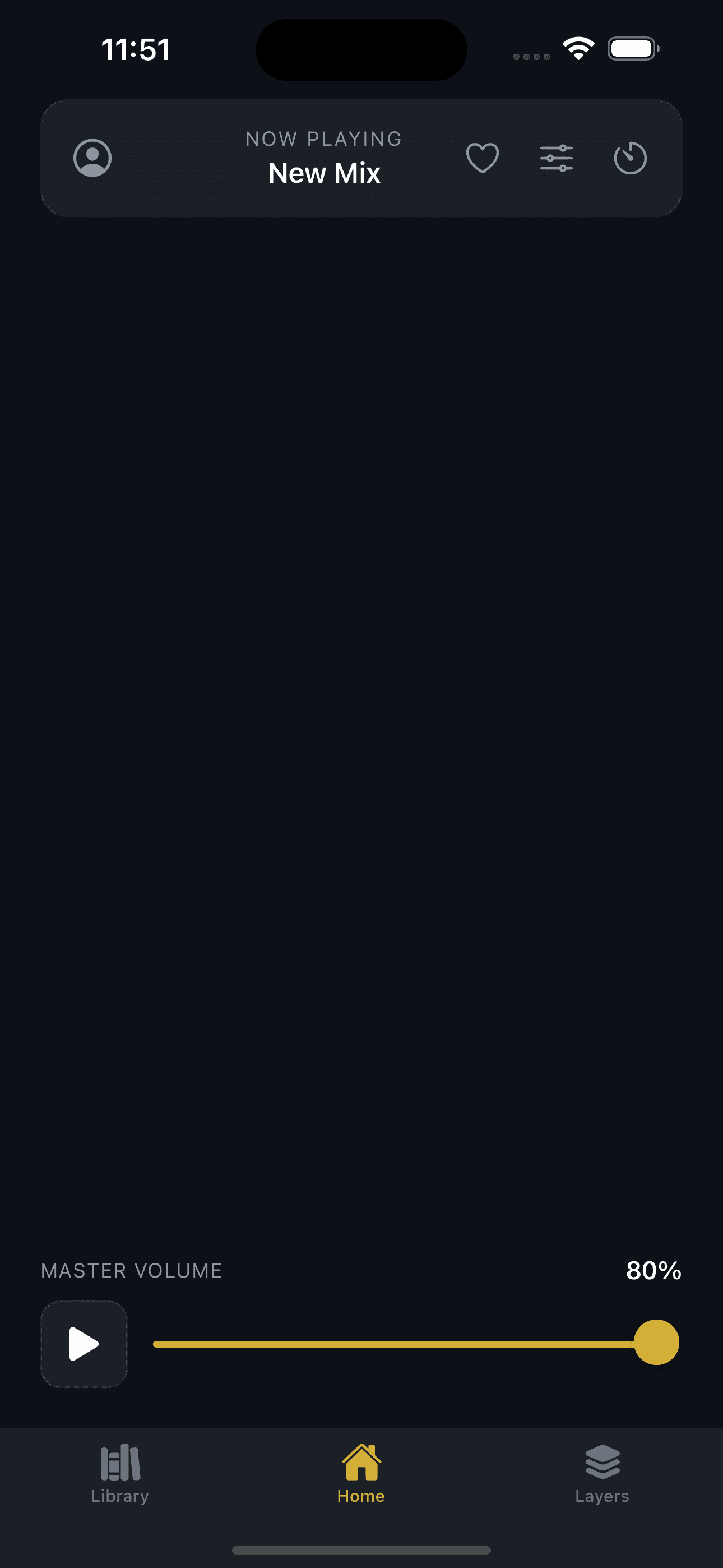
Tinnitus Masking Sounds home screen with pitch explorer and quick-start controls
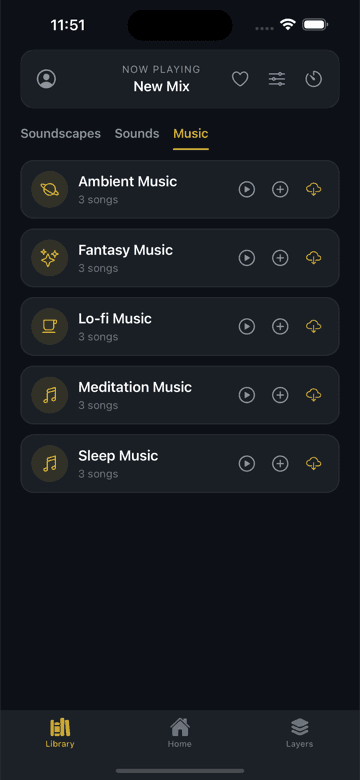
Soundscape library showing categorized ambient environments
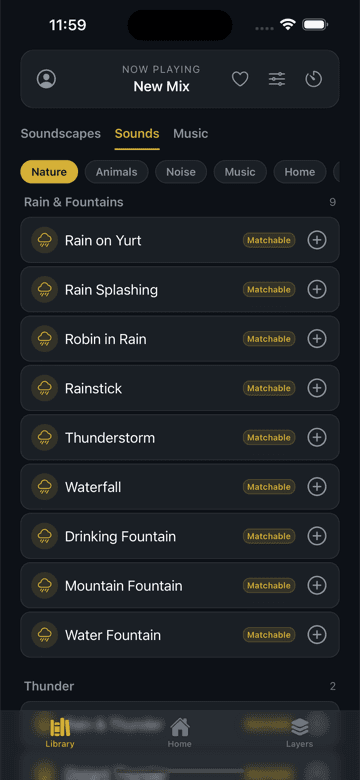
Sound library with 95+ individual sounds across noise, tonal, and nature categories
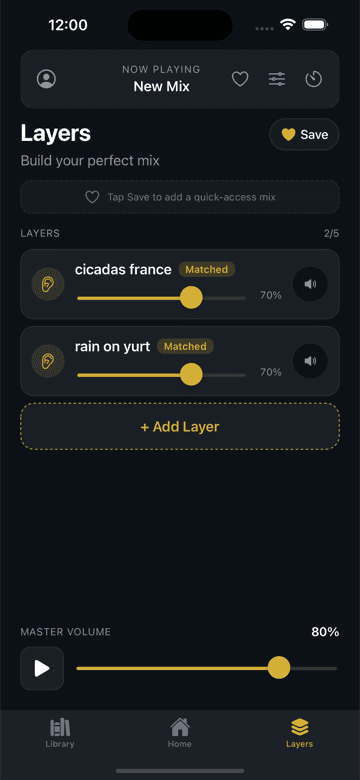
5-layer sound mixer with independent volume and pitch controls per layer
Pitch Exploration Tool
Play tones across a range and use them as a reference when building your mix.
5-Layer Sound Mixer
Combine up to five sounds simultaneously. Stack noise, tonal elements, and environmental textures.
95+ Sound Options
Broadband noise (white, pink, brown), tonal layers, rain, wind, ocean textures, and ambient recordings.
Advanced Audio Controls
Adjust levels, balance, and EQ for each layer independently.
Sleep Fade Mode
Set your mix to gradually fade over a selected time period.
Save & Revisit
Save combinations you prefer and return to them anytime.

How It Works

  1. 1

    Find your pitch

    Use the built-in pitch explorer to identify a tone that resembles what you hear, or enter a frequency if you already know it.

  2. 2

    Build your mix

    Choose from 95+ sounds and layer up to five at once. Adjust each layer until the background feels right.

  3. 3

    Save what works

    Save mixes for different situations and come back to them anytime.

Why Choose siasola Tinnitus Masking Sounds?

FeaturesiasolaIndustry standard
Collects personal dataNoYes
Data sellingNoYes
Sound controlMulti-layer mixerFixed presets
Upgrade modelClear and transparentHidden fees
OnboardingNo dark patternsManipulative

Built to stay out of your way.

How People Use Tinnitus Masking Sounds

Quiet environments can make tinnitus more noticeable. Tinnitus Masking Sounds lets you fill that silence with layered audio you control.

Nighttime routines

Silence at bedtime can make tinnitus stand out. Layer brown noise with rain or a low tone to create a steady background. Set the sleep fade timer so the mix gradually stops after you fall asleep.

Work or study

Build a consistent audio backdrop that stays out of the way during focused sessions. Choose broadband noise, tonal layers, or ambient textures. Adjust each layer independently so nothing competes with what you are reading or writing.

Reading or downtime

Explore different sound combinations at your own pace. Try pitch ranges you have not used before, save the ones you prefer, and come back to them whenever you want a familiar background.

Individual experiences vary.

Pricing

Free

$0
  • Pitch exploration
  • 20+ core sounds
  • 2-layer mixing
  • Single fade timer

Premium Monthly

$4.99/mo
  • Pitch exploration
  • Full 95+ sound library
  • 5-layer mixing
  • Advanced audio controls
  • Customizable fade timers
  • 10 saved mixes
  • Priority support
Best value

Premium Yearly

$29.99/year

Just $2.50/mo (save 50%)

  • Pitch exploration
  • Full 95+ sound library
  • 5-layer mixing
  • Advanced audio controls
  • Customizable fade timers
  • Unlimited saved mixes
  • Priority support
  • Early access to new sounds

Coming soon to the App Store. 21-day free trial, 3x longer than most apps. Cancel anytime. Free tier does not expire.

Pricing
PlanPriceFeatures
Free$0Pitch exploration, 20+ core sounds, 2-layer mixing, Single fade timer
Premium Monthly$4.99/moPitch exploration, Full 95+ sound library, 5-layer mixing, Advanced audio controls, Customizable fade timers, 10 saved mixes, Priority support
Premium Yearly$29.99/yearPitch exploration, Full 95+ sound library, 5-layer mixing, Advanced audio controls, Customizable fade timers, Unlimited saved mixes, Priority support, Early access to new sounds

Frequently asked questions

No. siasola Tinnitus Masking Sounds is a sound customization tool that provides sound masking functionality for personal use. It does not diagnose, treat, cure, or prevent any medical condition. If you experience persistent ringing, buzzing, or other auditory symptoms, consult a qualified healthcare professional. Tinnitus Masking Sounds is designed for personal sound exploration and can be used alongside professional guidance.

Tinnitus Masking Sounds includes over 95 sounds across multiple categories. The library features broadband noise options including white, pink, brown, and gray noise variations. Tonal layers with adjustable frequencies let you target specific pitch ranges. Nature recordings cover rain, wind, ocean waves, forest ambience, and flowing water. Additional categories include ambient textures and environmental recordings designed for different masking approaches. Each sound category serves a distinct purpose, from broad-spectrum masking to focused frequency targeting. The library is expanding regularly with new sounds added based on user feedback.

The Tinnitus Masking Sounds pitch explorer lets you listen to reference tones across a wide frequency range and adjust the pitch until you find the closest match to what you hear. Once identified, you can use that frequency information to build targeted sound layers. This approach helps you customize your masking mix more precisely than generic noise alone. You can also enter a known frequency directly if you already have that information. The pitch explorer is available in the free tier.

Yes, Tinnitus Masking Sounds includes a dedicated sleep fade mode. You set a gradual fade timer and your mix plays at your chosen volume, then decreases smoothly over the period you select. Timer options range from 15 minutes to 8 hours, covering everything from short naps to full nights. Many users find that layered background audio helps create a softer nighttime environment compared to complete silence. The fade timer ensures your mix stops automatically so it does not play all night unless you want it to. Sleep fade is one of the most popular features among Tinnitus Masking Sounds users.

siasola does not collect or store your personal data. Your sound mixes, preferences, and listening habits stay on your device. The only data siasola collects is crash reports and basic technical diagnostics to fix bugs and improve app stability. Purchases and subscriptions are handled entirely through Apple. siasola does not process payments or store payment information. There is no siasola account to create. You sign in through your Apple ID, and that relationship stays between you and Apple.

Yes, Tinnitus Masking Sounds works fully offline after the initial download. All core sounds are included in the app bundle, so no streaming or internet connection is required for playback or mixing. This makes it ideal for sleep environments where you want your phone in airplane mode, or for travel situations with limited connectivity. The complete sound library is stored locally on your device. You can build, save, and play mixes anywhere without worrying about buffering, data usage, or signal strength. Offline functionality works the same for both free and premium tiers.

siasola collects only limited technical data necessary to operate the app. We do not sell personal data, use advertising trackers, share information with third-party analytics platforms, or build behavioral profiles. Usage data is limited to crash reports and basic diagnostics that help us fix bugs and improve stability. Your sound preferences, mixes, and listening habits stay on your device. See our Privacy Policy for complete details on what is collected and how it is handled. siasola is compliant with applicable data protection regulations and committed to transparent data practices.

Tinnitus Masking Sounds free tier includes pitch exploration, 20+ core sounds, 2-layer mixing, and a basic fade timer. The free tier does not expire and is genuinely useful as a standalone tool for sound masking. Upgrade to Pro for the full 95+ sound library, 5-layer mixing, advanced audio controls including per-layer EQ and balance, extended fade options, and saved presets. There is no paywall blocking core functionality. Many users find the free tier meets their needs without upgrading. Pro is available at $4.99 per month or $29.99 per year for users who want the complete feature set.

siasola uses AI-assisted techniques to generate and optimize audio content. Our approach prioritizes sound quality and utility over engagement metrics. AI helps us create nuanced frequency patterns and ambient textures that would be impractical to produce manually. Unlike platforms that use AI to maximize screen time or serve targeted ads, siasola's AI serves a single purpose: helping you build a better sound environment. All AI-generated content is reviewed for quality before inclusion in the sound library.

Start Building Your Personal Sound Environment

Free tier available·No personal data collected·No data selling